Artificial intelligence has transformed the way we create images, write content, design products, and automate creative workflows. Yet despite the incredible power of AI tools, many users still experience disappointing results.
They type a prompt into an AI image generator or chatbot expecting something extraordinary… only to receive something generic, confusing, or completely different from what they imagined.
The problem usually isn’t the AI.
The problem is the prompt.
A poorly written prompt leads to weak results. A well-crafted prompt acts like a blueprint, giving the AI clear instructions and creative direction.
The good news?
Bad prompts can almost always be transformed into powerful, highly effective prompts.
In this complete guide, you’ll learn exactly how to turn bad prompts into perfect ones, improve image quality, gain better control over AI outputs, and think like a professional prompt engineer.
Why Most AI Prompts Fail
Many beginners assume AI can read minds.
They enter vague requests like:
“Make a cool image”
or
“Create a beautiful woman”
Then they wonder why the result feels random or low quality.
AI works through interpretation.
When your prompt lacks detail, the AI fills in missing information on its own—and that often leads to inconsistent or disappointing outputs.
A weak prompt creates randomness.
A strong prompt creates direction.
What Makes a Prompt “Bad”?
A bad prompt is usually:
Too vague
Too short
Missing context
Lacking visual direction
Conflicting
Overly generic
Missing important details
For example:
Bad Prompt:
“A city at night”
This gives almost no guidance.
Questions remain unanswered:
What type of city?
Futuristic or realistic?
What mood?
What lighting?
What camera angle?
What weather?
What style?
The AI improvises everything.
What Makes a Prompt “Perfect”?
A perfect prompt gives clear, structured creative instructions.
It includes:
Subject clarity
Visual style
Lighting direction
Composition guidance
Material details
Mood and atmosphere
Camera perspective
Rendering quality
Perfect prompts reduce randomness.
They increase predictability and control.
The Golden Rule of Prompt Engineering
The simplest way to improve prompts is this:
Specificity creates better results.
The more precise your instructions, the more accurate the image becomes.
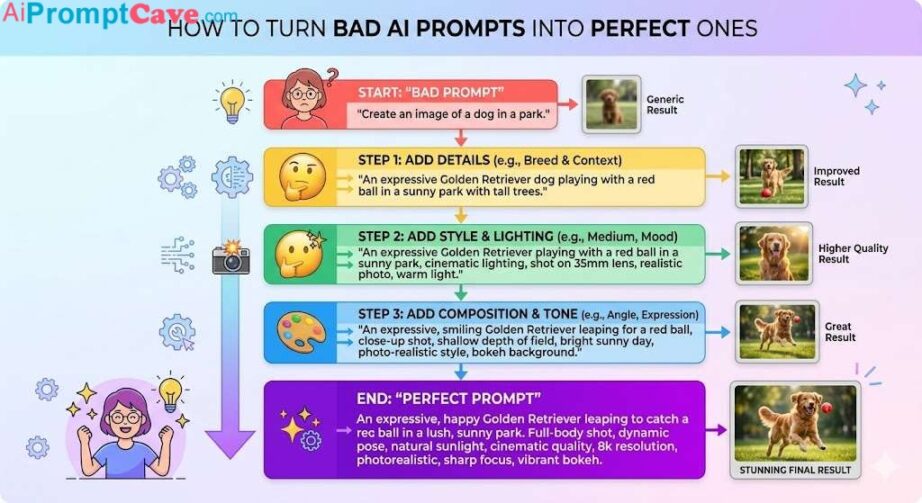
Compare these examples:
Weak Prompt:
“A dog”
Better Prompt:
“A golden retriever in a park”
Strong Prompt:
“A hyper-realistic golden retriever sitting in a sunny park during golden hour, cinematic lighting, shallow depth of field, ultra-detailed fur, warm atmosphere”
Notice how clarity increases quality.
Step 1: Start with a Clear Subject
The biggest problem in bad prompts is weak subject definition.
Bad:
“A car”
Better:
“A black sports car”
Strong:
“A glossy black futuristic sports car with aerodynamic curves and LED headlights”
Ask yourself:
What exactly am I trying to create?
Be specific.
Step 2: Add Style Direction
Without style instructions, AI often creates generic results.
Style tells the AI how the image should feel.
Popular Style Keywords:
Cinematic
Hyper-realistic
Luxury commercial
Editorial photography
Cyberpunk
Minimalist
Fantasy
Anime
Example:
Bad:
“A house”
Better:
“A modern luxury house”
Strong:
“A cinematic luxury modern house surrounded by mist, ultra-realistic architecture photography”
Step 3: Fix the Lighting
Lighting is one of the most overlooked improvements.
Bad prompts rarely mention lighting.
But lighting affects:
realism
emotion
atmosphere
depth
Lighting Keywords:
Soft lighting
Golden hour lighting
Cinematic lighting
Dramatic shadows
Studio lighting
Neon glow
Volumetric lighting
Example:
Bad:
“A portrait of a man”
Better:
“A portrait of a man with soft lighting”
Strong:
“A cinematic portrait of a confident man with dramatic soft lighting and realistic shadows”
Lighting transforms images instantly.
Step 4: Add Camera Perspective
Professional visuals feel cinematic because of camera control.
Most bad prompts ignore this.
Camera Keywords:
Close-up shot
Wide-angle shot
Macro lens
Low-angle shot
Eye-level shot
Shallow depth of field
Example:
Bad:
“A burger”
Better:
“A burger close-up”
Strong:
“Macro close-up shot of a gourmet cheeseburger with shallow depth of field and dramatic food photography lighting”
Step 5: Improve Material Details
Weak prompts ignore textures.
Great prompts emphasize realism.
Material Keywords:
Glossy
Metallic
Matte
Wet texture
Reflective surface
Fabric texture
Example:
Bad:
“A luxury watch”
Better:
“A gold luxury watch”
Strong:
“A glossy gold luxury watch with metallic reflections and ultra-detailed craftsmanship”
Material details create premium quality.
Step 6: Add Environment & Background
Bad prompts often ignore the setting.
Background matters.
Example:
Bad:
“A warrior”
Better:
“A warrior in a forest”
Strong:
“A cinematic fantasy warrior standing in a misty enchanted forest during sunrise”
The environment strengthens storytelling.
Step 7: Control Mood & Emotion
Emotion affects engagement.
Think about how the image should feel.
Mood Keywords:
Dramatic
Elegant
Dark
Futuristic
Calm
Mysterious
Energetic
Example:
Bad:
“A robot”
Strong:
“A futuristic robot in a dark cinematic atmosphere with glowing blue neon accents”
Step 8: Add Rendering Quality
Professional prompts usually include quality instructions.
Quality Keywords:
Ultra-detailed
Hyper-realistic
8K
HDR
Sharp focus
These improve clarity.
Before & After Prompt Examples
Example 1 — Portrait
Bad Prompt:
“A woman”
Better Prompt:
“A realistic woman portrait”
Perfect Prompt:
“A hyper-realistic portrait of an elegant woman, cinematic soft lighting, shallow depth of field, realistic skin texture, warm tones, ultra-detailed, 8K”
Example 2 — Product Photography
Bad Prompt:
“Perfume bottle”
Better Prompt:
“Luxury perfume bottle”
Perfect Prompt:
“Luxury black perfume bottle with gold metallic accents on reflective marble, cinematic studio lighting, macro commercial photography, dramatic shadows, ultra-detailed”
Example 3 — Food Photography
Bad Prompt:
“Chocolate”
Better Prompt:
“Luxury chocolate”
Perfect Prompt:
“Floating dark chocolate explosion with glossy melted caramel, cinematic food photography lighting, macro lens detail, rich textures, ultra-realistic, 8K”
Step 9: Remove Conflicting Instructions
Many bad prompts fail because they contain contradictions.
✅ Is the subject clear? ✅ Did I define the style? ✅ Did I specify lighting? ✅ Did I choose a camera angle? ✅ Did I describe textures? ✅ Did I control the background? ✅ Did I include mood? ✅ Did I add quality keywords?
If yes, your prompt is likely much stronger.
Real-World Applications
Better prompts help with:
Marketing
Luxury product ads.
Blogging
Featured images.
Social Media
Viral content.
Branding
Consistent aesthetics.
Ecommerce
Professional product visuals.
The Future of Prompt Optimization
AI is improving rapidly.
Future tools may:
auto-enhance prompts
suggest improvements
optimize lighting automatically
improve composition consistency
But strong prompting skills will still matter.
Final Thoughts
Turning bad prompts into perfect ones is not about writing complicated instructions.
It’s about writing clear, intentional, visually structured prompts.
Remember:
Bad prompts create randomness. Great prompts create direction.
The difference between mediocre AI images and breathtaking professional visuals often comes down to how well you describe your vision.
Start thinking like:
a photographer
an art director
a filmmaker
a commercial advertiser
The better your prompts become, the better your results will be.
Master prompt improvement, and you’ll unlock the true power of AI image generation.