Artificial intelligence image generation has evolved at an incredible pace. Tools like ChatGPT image generation, Midjourney, DALL·E, Stable Diffusion, and Nano Banana can create stunning visuals within seconds. From cinematic portraits to hyper-realistic product ads, AI-generated visuals are transforming content creation, marketing, and design.
However, despite the impressive progress, there is one issue that still frustrates creators: AI images sometimes look weird.
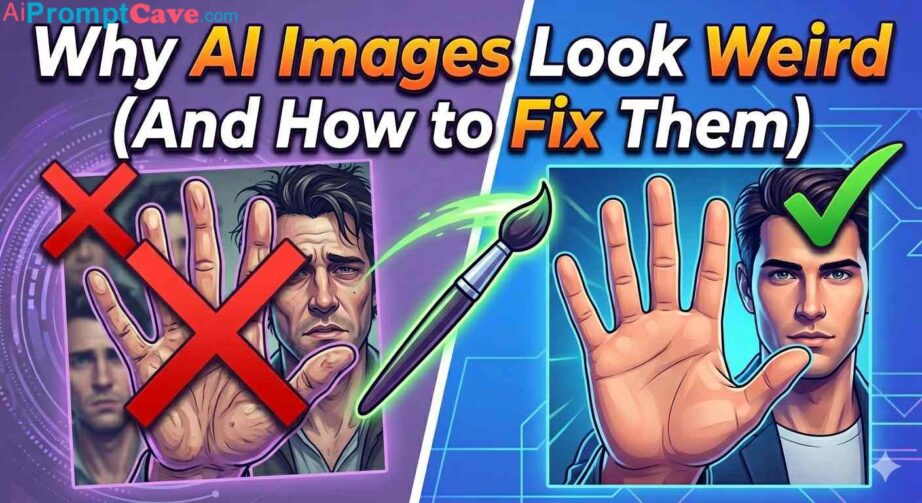
You’ve probably seen it before—hands with too many fingers, distorted faces, strange text, melting objects, impossible shadows, or backgrounds that simply don’t make sense. Sometimes the image looks almost perfect until you zoom in and notice bizarre details that completely ruin the realism.
So why does this happen?
More importantly, how can you fix it?
In this complete guide, we’ll explore why AI images look weird, the science behind common AI mistakes, and practical fixes that dramatically improve image quality.
Understanding Why AI Images Sometimes Look Strange
AI image generators do not “understand” the world like humans do.
Instead, they predict what an image should look like based on billions of visual patterns learned during training. The model studies enormous datasets of images and text descriptions, then learns statistical relationships between shapes, colors, objects, anatomy, lighting, and composition.
This means AI is essentially making an educated guess.
Sometimes the guess is excellent.
Other times, things go off the rails.
The weirdness happens because AI doesn’t truly know anatomy, physics, perspective, or object behavior. It only predicts probabilities.
For example:
Humans know a hand has five fingers.
AI predicts what hands generally look like.
That difference is massive.
If the training data contains inconsistent hand positions or unclear visuals, the AI can generate distorted fingers, fused limbs, or impossible gestures.
This explains why highly detailed scenes often break down under close inspection.
The Most Common Reasons AI Images Look Weird
1. Hands and Fingers Are Incorrect
The biggest AI image problem is almost always hands.
Hands are incredibly complex. They contain:
Multiple joints
Overlapping shapes
Unusual angles
Frequent occlusions
Dynamic motion
Even professional artists struggle with hands.
AI struggles even more.
Common hand problems include:
Extra fingers
Missing fingers
Melted hands
Deformed joints
Fingers merging together
For example, someone holding a coffee mug may suddenly have seven fingers wrapped around it.
How to Fix Weird Hands
The solution often comes down to prompting.
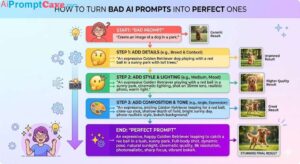
Instead of writing:
A woman drinking coffee
Write:
A realistic portrait of a woman holding a coffee mug naturally with anatomically correct hands, realistic fingers, detailed skin texture, natural hand positioning.
Specific prompts improve accuracy dramatically.
You can also:
Use image inpainting tools
Regenerate only the hands
Crop problematic areas
Hide hands outside the frame
Sometimes the easiest fix is simply changing composition.
For instance:
Hands in pockets
Arms crossed
Holding objects partially out of frame
Professional photographers use similar tricks.
2. Faces Look Uncanny or Distorted
Another major problem is the uncanny valley effect.
This happens when an image looks almost human—but not quite.
The face may seem realistic at first glance, but something feels “off.”
Typical facial problems include:
Misaligned eyes
Uneven pupils
Strange smiles
Melting skin texture
Missing teeth
Asymmetrical features
Why?
Faces require precise symmetry and proportion.
Humans instantly detect even tiny errors because our brains are wired to recognize faces.
How to Fix Weird Faces
Try these prompt additions:
“symmetrical face”
“realistic facial proportions”
“detailed skin texture”
“natural eyes”
“photorealistic portrait”
Avoid vague prompts.
Bad prompt:
Beautiful girl
Better prompt:
Photorealistic close-up portrait of a woman with symmetrical facial features, natural skin texture, realistic eyes, cinematic lighting, ultra detailed.
Using close-up framing often helps because the AI focuses attention on facial quality.
Another trick is lowering stylization settings if your generator supports them.
Too much creativity often increases facial distortions.
3. Text in AI Images Looks Gibberish
One of the funniest AI failures is fake text.
You ask for:
A billboard saying “Coffee Shop”
And receive:
Cfffe Shpo QLPTY
Why?
AI image models struggle with typography because letters are visual symbols requiring exact placement.
The model treats text more like shapes than language.
It predicts what text looks like, not necessarily what it says.
How to Fix Text Problems
Best solution:
Add text manually afterward.
Use tools like:
Photoshop
Canva
Figma
CapCut
Illustrator
Generate the image without text first.
Then overlay clean typography.
If you must generate text directly, write prompts like:
Clear readable text, centered typography, professional advertising poster.
Still, manual editing usually wins.
For blog thumbnails, advertisements, and YouTube covers, post-editing is the professional approach.
4. Backgrounds Become Chaotic
Sometimes the main subject looks amazing…
But the background feels completely random.
You may notice:
Floating objects
Impossible architecture
Confusing layouts
Inconsistent perspective
Weird environmental details
For example:
A luxury office scene suddenly includes floating lamps or distorted furniture.
This happens because AI prioritizes the main subject and treats backgrounds as secondary guesses.
How to Fix Background Issues
Be extremely descriptive.
Instead of:
Man in office
Try:
A businessman sitting in a modern luxury office with realistic furniture, large glass windows, organized desk, clean composition, natural lighting.
Adding words like:
minimal background
uncluttered composition
realistic environment
clean interior design
helps significantly.
5. Lighting Feels Fake
Real photography follows physical light behavior.
AI sometimes ignores these rules.
You may see:
Multiple impossible shadows
Inconsistent reflections
Light coming from nowhere
Strange glow effects
The result feels artificial.
Even when viewers cannot explain why an image looks wrong, lighting often reveals the issue subconsciously.
How to Fix Lighting Problems
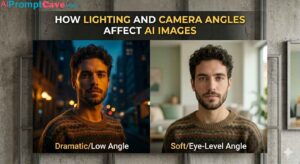
Specify lighting clearly.
Examples:
cinematic lighting
golden hour sunlight
studio softbox lighting
natural daylight
realistic shadows
Good prompt example:
Luxury skincare product photography with realistic studio lighting, soft reflections, natural shadows, premium advertisement style.
The more specific you are, the better the AI understands your vision.
Ultra-realistic luxury sports car parked beside a neon-lit city street at night, cinematic lighting, wet reflections, low camera angle, premium automotive photography, 8K details.
This instantly improves results.
Why AI Image Quality Varies Between Tools
Different generators excel at different things.
Some are better at:
Faces
Product photography
Text rendering
Stylized art
Realism
For example:
ChatGPT image generation may excel at polished creative concepts.
Nano Banana might offer stronger speed or stylistic flexibility.
Other models prioritize artistic style over realism.
Experimentation matters.
Sometimes switching models fixes weird outputs instantly.
The Hidden Role of Training Data
AI quality depends heavily on training data.
If a model has seen millions of high-quality portraits, faces improve.
If it lacks examples of unusual hand angles, weird hands appear.
Biases in datasets also affect outcomes.
For example:
Certain professions, clothing, or cultural styles may appear inaccurately represented.
This isn’t always intentional—it’s often a limitation of training material.
Better datasets equal better outputs.
Negative Prompting: A Powerful Fix
Some AI tools support negative prompts.
These tell the AI what to avoid.
Example:
Prompt:
Luxury fashion portrait, cinematic lighting
Negative Prompt:
blurry, distorted hands, extra fingers, bad anatomy, unrealistic face, low quality, duplicate objects
This dramatically reduces weirdness.
Think of negative prompts as quality control.
Why AI Gets Better After Multiple Attempts
One mistake beginners make:
Generating only once.
Professionals generate dozens or even hundreds of versions.
AI art is iterative.
A typical workflow:
Generate draft
Choose strongest image
Refine prompt
Regenerate problem areas
Upscale
Edit details manually
The first image is rarely perfect.
Iteration creates quality.
Professional Tricks for Better AI Images
Here are practical secrets creators use.
Use Photography Language
AI understands photography terminology surprisingly well.
Try:
shallow depth of field
DSLR photo
macro lens
cinematic composition
soft focus background
These improve realism.
Use Camera Angles
Examples:
close-up shot
wide-angle shot
overhead shot
low-angle perspective
Camera direction reduces randomness.
Control the Composition
Prompt:
centered composition
or
balanced framing
This prevents visual chaos.
Use Reference Styles Carefully
Instead of vague aesthetics:
modern luxury skincare campaign
or
premium Apple-style advertisement
Clear direction improves consistency.
Add Material Details
Bad:
luxury watch
Better:
luxury stainless steel watch with brushed metal texture, reflective sapphire crystal, premium studio lighting
Texture detail matters.
When Weird AI Images Can Actually Be Good
Interestingly, strange images are not always bad.
Sometimes surreal mistakes become creative advantages.
For example:
Fantasy art
Horror imagery
Abstract concepts
Dreamlike visuals
Experimental branding
A slightly uncanny feel can be memorable.
Many viral AI images became popular because they looked weird.
The key is intentionality.
If weirdness feels accidental, it hurts quality.
If weirdness feels artistic, it becomes style.
The Future of AI Image Realism
AI image quality is improving rapidly.
Recent advancements already reduced:
Finger problems
Facial distortions
Lighting mistakes
Anatomy errors
Future systems will likely include:
Better physics simulation
Stronger text rendering
Improved anatomy understanding
Consistent multi-character scenes
Near-perfect realism
Eventually, spotting AI mistakes may become difficult.
But for now, understanding the limitations gives creators a major advantage.
Final Thoughts
AI images look weird because artificial intelligence does not truly understand reality—it predicts visual patterns.
That prediction system creates incredible art, but it also causes mistakes involving anatomy, text, lighting, physics, and composition.
The good news?
Most problems are fixable.
Better prompts, realistic photography terms, cleaner composition, negative prompting, and manual editing can transform poor outputs into professional-quality visuals.
Instead of blaming the AI, think of image generation as collaboration.
You guide.
The AI creates.
The more clearly you communicate your vision, the better your results become.
Creators who learn how AI fails are the ones who consistently produce stunning visuals.
Why AI Images Look Weird (And Fixes): Common Problems Explained – Free Ai Image Prompt
Discover why AI images look weird, common AI art mistakes, and proven fixes for hands, faces, text, anatomy, and realism.