

Creating stunning AI-generated images isn’t just about having a good idea—it’s about using the right keywords. In the world of AI image generation, keywords act as the language that bridges your imagination and the final visual output.
If you’ve ever wondered why some AI images look cinematic, hyper-realistic, and professional while others look flat or generic, the answer often comes down to keyword selection.
In this comprehensive guide, you’ll learn the best keywords to use in AI image prompts, how they work, and how to combine them effectively to create high-quality, eye-catching visuals.
What Are Keywords in AI Image Prompts?
Keywords are specific descriptive words or phrases that guide the AI model in generating an image. These words influence:
- Style
- Lighting
- Composition
- Texture
- Mood
- Quality
For example:
“A portrait of a man” → basic result
“A hyper-realistic portrait of a man, soft lighting, shallow depth of field, ultra-detailed, 8K” → professional result
The difference lies in the keywords.
Why Keywords Matter So Much
AI models rely on patterns learned from massive datasets. Keywords help the model understand exactly what you want.
Better keywords = better control = better images
Without strong keywords:
- Images may look generic
- Details may be missing
- Style may be inconsistent
With strong keywords:
- Images look polished
- Lighting feels realistic
- Composition becomes cinematic
Core Keyword Categories You Must Know
To master AI prompts, you need to understand different keyword categories.
1. Quality & Resolution Keywords
These keywords improve overall image clarity and sharpness.
Examples:
- Ultra-detailed
- High resolution
- 4K
- 8K
- Sharp focus
- HDR
- Photorealistic
- Hyper-realistic
Example Prompt:
“A hyper-realistic portrait, ultra-detailed, 8K resolution, sharp focus”
These are some of the most powerful keywords you can use.
2. Lighting Keywords (Game Changer)
Lighting is one of the most important factors in image quality.
Examples:
- Soft lighting
- Cinematic lighting
- Studio lighting
- Golden hour
- Neon lighting
- Dramatic lighting
- Backlighting
- Rim lighting
Example:
“Cinematic lighting with golden hour glow and soft shadows”
Lighting keywords dramatically enhance mood and realism.
3. Camera & Photography Keywords
These keywords simulate real camera behavior.
Examples:
- Depth of field
- Shallow depth of field
- Bokeh
- Wide-angle shot
- Close-up
- Macro lens
- Low angle
- High angle
Example:
“Close-up shot with shallow depth of field and bokeh background”
These make images feel like real photographs.
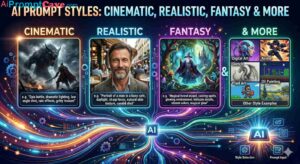
4. Style Keywords
Style defines the artistic direction of the image.
Popular Styles:
- Cinematic
- Minimalist
- Fantasy
- Cyberpunk
- Vintage
- Futuristic
- Cartoon
- Anime
- Oil painting
- 3D render
Example:
“A cinematic cyberpunk city with neon lights”
Combining styles can create unique visuals.
5. Color & Mood Keywords
These keywords control the emotional tone of the image.
Examples:
- Warm tones
- Cool tones
- Vibrant colors
- Pastel colors
- Dark mood
- Moody atmosphere
- High contrast
Example:
“Dark moody atmosphere with cool blue tones”
6. Texture & Material Keywords
These add realism and detail.
Examples:
- Glossy
- Matte
- Metallic
- Glass
- Wood texture
- Fabric texture
- Smooth surface
Example:
“A glossy black sports car with metallic reflections”
7. Environment & Background Keywords
These define the setting.
Examples:
- City street
- Forest
- Beach
- Studio background
- Space
- Futuristic city
- Desert
Example:
“In a futuristic city with neon lights and rain”
8. Composition Keywords
These control how elements are arranged.
Examples:
- Centered composition
- Symmetrical
- Rule of thirds
- Minimal composition
- Dynamic angle
Example:
“Centered composition with symmetrical design”
9. Action & Motion Keywords
These add life and movement.
Examples:
- Motion blur
- Dynamic pose
- Running
- Flying
- Splashing water
- Wind effect
Example:
“A runner in motion with motion blur effect”
10. Emotion & Expression Keywords
Useful for portraits and storytelling.
Examples:
- Happy
- Sad
- Intense
- Confident
- Calm
- Mysterious
Example:
“A confident woman with a strong expression”
How to Combine Keywords Effectively
The real magic happens when you combine keywords from different categories.
Example Prompt:
“A hyper-realistic portrait of a confident woman, soft studio lighting, shallow depth of field, warm tones, ultra-detailed, 8K resolution”
This combines:
- Quality
- Lighting
- Camera
- Emotion
- Color
The “Stacking” Technique
Stacking means layering keywords to build complexity.
Basic Prompt:
“A car”
Improved Prompt:
“A luxury sports car”
Advanced Prompt:
“A hyper-realistic luxury sports car, glossy red paint, cinematic lighting, wet street reflections, low angle shot, ultra-detailed, 8K”
Each layer improves the result.
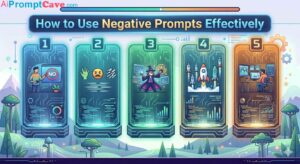
Negative Keywords (What to Avoid)
Negative prompts improve quality by removing unwanted elements.
Examples:
- Low quality
- Blurry
- Distorted
- Extra limbs
- Bad anatomy
Example:
“No blur, no distortion, no low quality”
Common Keyword Mistakes
1. Using Too Few Keywords
Leads to generic results.
2. Using Too Many Conflicting Keywords
Can confuse the AI.
3. Ignoring Lighting
One of the biggest mistakes.
4. No Style Direction
Results become inconsistent.
Keyword Templates You Can Use
Portrait Template:
“A hyper-realistic portrait of [subject], soft lighting, shallow depth of field, ultra-detailed, 8K”
Product Template:
“A luxury product on a reflective surface, cinematic lighting, high detail, professional photography”
Landscape Template:
“A cinematic landscape with [environment], golden hour lighting, wide-angle shot, ultra-detailed”
Advanced Keyword Strategies
1. Style Fusion
Combine styles:
“Cyberpunk + cinematic + photorealistic”
2. Contrast Keywords
Mix opposites:
“Dark background with bright neon lights”
3. Focus Keywords
Direct attention:
“Sharp focus on subject, blurred background”
4. Storytelling Keywords
Add narrative:
“A lonely traveler in a vast desert at sunset”
Real-World Use Cases
Marketing
Create ads and promotional visuals.
Social Media
Generate viral content.
Blogging
Design featured images.
Branding
Create consistent visual identity.
E-commerce
Generate product mockups.
Practice Prompts
Example 1:
“A futuristic city at night, neon lights, cyberpunk style, cinematic lighting, ultra-detailed, 8K”
Example 2:
“A luxury watch on a black background, studio lighting, high contrast, sharp focus, professional photography”
Example 3:
“A magical forest with glowing trees, fantasy style, soft lighting, mist, ultra-detailed”
How to Improve Your Keyword Skills
- Study high-quality prompts
- Experiment with variations
- Save successful prompts
- Analyze what works
- Practice regularly
The Future of AI Prompt Keywords
As AI evolves, keyword usage will become more advanced.
Future developments may include:
- AI-suggested keywords
- Real-time prompt editing
- Voice-based prompts
- More precise control over details
Final Thoughts
Keywords are the foundation of AI image prompts.
They determine:
- How your image looks
- How detailed it is
- How realistic it feels
To create stunning AI images, remember:
- Use descriptive keywords
- Combine multiple categories
- Control lighting and style
- Avoid common mistakes
- Keep experimenting
Your results are only as good as your keywords.
Master keyword usage, and you unlock the true power of AI image generation.
Read More : Ai Articles
Read More : Prompt Engineering for Marketing Campaigns: The Complete Guide
Read More : 10 Powerful Prompt Engineering Techniques You Must Know
Read More : Common Prompt Engineering Mistakes and How to Fix Them
Interesting Prompts: