Artificial intelligence has completely transformed the way we create images. What once required advanced design skills, expensive software, and hours of manual work can now be achieved in seconds using AI image generators. But there’s a catch—the quality of the image depends entirely on the quality of the prompt.
If you’ve ever typed something simple like “a beautiful landscape” and received a generic or disappointing result, you’re not alone. The difference between an average AI-generated image and a breathtaking one lies in how well you craft your prompt.
This beginner-friendly guide will teach you everything you need to know about writing stunning AI image prompts—from the basics to advanced techniques—so you can consistently generate high-quality visuals.
What is an AI Image Prompt?
An AI image prompt is a text description that tells an AI model what kind of image to generate. It acts as a set of instructions that guide the AI in creating visuals based on your input.
For example:
“A futuristic city at night”
“A realistic portrait of a young woman with soft lighting”
“A cyberpunk street scene with neon lights and rain”
Each of these prompts produces a different result depending on how detailed and structured it is.
Why Prompts Matter More Than You Think
AI models don’t “see” images the way humans do. Instead, they interpret words and convert them into visual patterns based on training data.
This means:
Your prompt is the blueprint of your image.
A vague prompt leads to vague results. A detailed, structured prompt leads to precise and visually stunning outputs.
The Anatomy of a Perfect AI Image Prompt
A strong prompt usually includes several key elements:
1. Subject (What is the image about?)
Start with the main focus.
Example:
“A luxury sports car”
2. Style (How should it look?)
Define the artistic direction.
Examples:
Photorealistic
Cinematic
Cartoon
Oil painting
3D render
Example:
“A photorealistic luxury sports car”
3. Details (Add depth and richness)
Include textures, materials, and specific features.
Example:
“A photorealistic luxury sports car with glossy red paint, carbon fiber details, and LED headlights”
4. Lighting (Critical for realism)
Lighting dramatically affects the mood.
Examples:
Soft lighting
Golden hour
Neon lighting
Studio lighting
Example:
“Under cinematic golden hour lighting”
5. Environment (Where is it?)
Describe the setting.
Example:
“Parked on a wet city street at night with reflections”
6. Camera & Composition
Control how the image is framed.
Examples:
Close-up
Wide shot
Low angle
Depth of field
Example:
“Shot from a low angle with shallow depth of field”
Full Example Prompt:
“A photorealistic luxury sports car with glossy red paint and carbon fiber details, parked on a wet city street at night, neon reflections, cinematic lighting, low angle shot, shallow depth of field, ultra-detailed, 8K resolution”
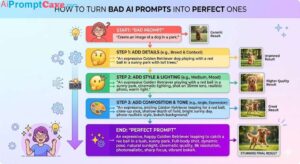
Step-by-Step: How to Write Stunning Prompts
Step 1: Start Simple
Begin with a basic idea.
“A mountain landscape”
Step 2: Add Style
Define how it should look.
“A cinematic mountain landscape”
Step 3: Add Details
Enhance realism.
“A cinematic mountain landscape with snow-covered peaks and a glowing sunset”
Step 4: Add Lighting & Atmosphere
Create mood.
“With golden hour lighting and soft mist”
Step 5: Add Camera Settings
Control composition.
“Wide-angle shot, ultra-detailed, 8K”
Final Prompt:
“A cinematic mountain landscape with snow-covered peaks and a glowing sunset, golden hour lighting, soft mist, wide-angle shot, ultra-detailed, 8K resolution”
Popular AI Image Styles You Should Try
Different styles create completely different results.
1. Photorealistic
Looks like a real photograph.
2. Cinematic
Inspired by movies with dramatic lighting.
3. Fantasy
Magical worlds and creatures.
4. Cyberpunk
Futuristic neon environments.
5. Minimalist
Clean and simple designs.
6. 3D Render
Modern product-style visuals.
Power Words That Improve Your Prompts
Certain keywords significantly enhance output quality:
Ultra-detailed
High resolution
8K
Sharp focus
Professional lighting
Hyper-realistic
Depth of field
Cinematic composition
Using these words helps guide the AI toward higher-quality results.
Negative Prompts: What to Avoid
Negative prompts tell the AI what NOT to include.
Examples:
“No blur”
“No distortion”
“No extra limbs”
“No low quality”
These are especially useful for improving image clarity and realism.
Common Mistakes Beginners Make
1. Being Too Vague
Bad:
“A nice image”
2. Overloading the Prompt
Too many conflicting details can confuse the AI.
3. Ignoring Lighting
Lighting is one of the most important elements.
4. No Style Definition
Without style, results may look generic.
5. Not Iterating
The first result is rarely perfect.
Advanced Techniques for Better Results
1. Prompt Layering
Build prompts step by step instead of writing everything at once.
2. Style Mixing
Combine multiple styles.
Example:
“Cinematic + photorealistic + cyberpunk”
3. Reference-Based Prompting
Use known styles or artists (if supported by the tool).
4. Aspect Ratio Control
Specify dimensions:
1:1 (square)
16:9 (landscape)
9:16 (portrait)
5. Consistency Prompts
Use repeated keywords to maintain style across images.
Real Use Cases for AI Image Prompts
1. Social Media Content
Create eye-catching visuals.
2. Marketing Campaigns
Design ads and product images.
3. Blog Thumbnails
Generate featured images.
4. Branding
Create logos and brand visuals.
5. E-commerce
Generate product mockups.
Example Prompts You Can Use
Product Ad:
“A luxury perfume bottle on a reflective black surface, golden lighting, dramatic shadows, cinematic product photography, ultra-detailed, 8K”
Portrait:
“A hyper-realistic portrait of a young woman, soft studio lighting, sharp focus, shallow depth of field, professional photography”
Fantasy Scene:
“A magical forest with glowing trees, floating lights, mystical atmosphere, cinematic lighting, ultra-detailed fantasy art”
How to Improve Your Results Over Time
Experiment with different styles
Study high-performing prompts
Save your best prompts
Analyze what works and why
Keep refining
Prompt engineering is a skill—you get better with practice.
The Future of AI Image Prompting
As AI evolves, prompting will become even more powerful.
Future trends include:
More control over fine details
Real-time prompt adjustments
Voice-based prompting
AI-assisted prompt suggestions
But one thing will remain the same:
The quality of your prompt will always determine the quality of your image.
Final Thoughts
Writing stunning AI image prompts is both an art and a science.
By mastering the fundamentals—subject, style, lighting, details, and composition—you can create visuals that look professional, cinematic, and highly engaging.
Remember:
Be specific
Be clear
Experiment often
Refine your prompts
With practice, you’ll move from generating average images to creating truly stunning visuals that stand out.
In the world of AI image generation, your creativity is no longer limited by tools—only by how well you can describe your vision.