Artificial intelligence image editing has evolved dramatically, and one tool that has attracted major attention among creators is Nano Banana—Google’s powerful AI image generation and editing system integrated into Gemini. Its biggest strength is not just creating images, but editing them intelligently while preserving realism and consistency across multiple changes.
Many beginners use Nano Banana like a normal image generator:
“Make this photo better.”
And while that sometimes works, professional-quality results require smarter prompting strategies.
The difference between average and exceptional outputs usually comes down to:
prompt structure
image references
editing precision
consistency control
lighting direction
iterative workflows
If you want cleaner edits, realistic transformations, premium product visuals, or highly consistent AI characters, this guide covers advanced Nano Banana techniques that can dramatically improve results.
What Makes Nano Banana Different?
Unlike traditional image generators that create visuals from scratch, Nano Banana is especially powerful at:
image editing
preserving identity
object replacement
style transformation
consistent multi-step editing
scene expansion
One of Nano Banana’s biggest advantages is maintaining subject consistency across edits better than many competing tools. This makes it extremely useful for branding, product marketing, storytelling, and character creation. (Nano Banana)
But to unlock its full power, you need better workflows.
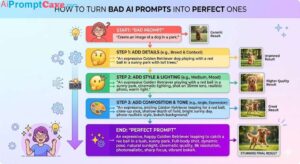
1. Stop Writing Generic Prompts
This is the biggest mistake beginners make.
Bad prompt:
“Make this image better.”
This gives Nano Banana too much freedom.
Instead, think like a creative director.
Better prompt:
“Enhance this portrait using soft natural lighting from the left, improve facial clarity while preserving realistic skin texture, subtly blur the background, and maintain a professional editorial photography look.”
Specific prompts consistently outperform vague ones.
2. Use Layered Instructions
Professional Nano Banana prompts work best when instructions are layered.
Instead of writing everything randomly, structure prompts into parts.
“Luxury watch on black marble, improve reflections and sharpness, cinematic luxury photography style, dramatic studio lighting, keep logo unchanged, ultra-detailed premium commercial look.”
This method increases control.
3. Lock Character Consistency
One of Nano Banana’s most impressive features is character consistency.
If you’re building:
fictional characters
influencers
storytelling visuals
fashion campaigns
You need consistency.
Instead of:
“Put this person in a café”
Use:
“Keep this character’s appearance identical while placing them inside a luxury café with warm cinematic lighting.”
Explicitly telling Nano Banana to preserve identity dramatically improves consistency.
Helpful consistency phrases:
keep facial features identical
preserve hairstyle
maintain same expression
keep outfit unchanged
maintain body proportions
The more specific you are, the better.
4. Control What Must NOT Change
Nano Banana sometimes edits more than intended.
Prevent this using micro constraints.
Example:
“Replace the background with a luxury hotel lobby but do not change the person’s face, clothing, pose, or jewelry.”
This technique reduces unwanted alterations significantly.
Think of it like giving boundaries.
5. Think Like a Photographer
Nano Banana responds very well to photography language.
Instead of:
“Make it realistic”
Try:
“Shot on a 50mm lens, soft daylight, shallow depth of field, natural shadows, realistic skin texture.”
Useful photography keywords:
Camera Terms
35mm lens
50mm lens
macro photography
wide-angle shot
Lighting Terms
cinematic lighting
Rembrandt lighting
soft diffused light
volumetric lighting
Composition Terms
close-up shot
low-angle perspective
editorial framing
centered composition
Specific photography language improves realism dramatically.
6. Use Sequential Editing Instead of One Giant Prompt
Beginners try to do everything at once.
Bad workflow:
“Change the outfit, replace background, improve lighting, add rain, make cinematic, change hair color, add city skyline.”
Too much.
Instead, work in stages.
Step 1
Fix composition.
Step 2
Adjust lighting.
Step 3
Enhance realism.
Step 4
Add effects.
Nano Banana performs better with iterative editing because it remembers previous context during conversations.
Smaller edits = cleaner results.
7. Master Lighting Prompts
Lighting changes everything.
Even mediocre images become premium with better lighting.
Try prompts like:
Luxury Look
“Add dramatic luxury studio lighting with soft shadows.”
Cinematic Mood
“Transform the lighting into a cinematic rainy-night atmosphere.”
Soft Portrait
“Use soft golden-hour lighting with subtle warm highlights.”
Nano Banana handles lighting transformations extremely well when prompts are precise.
8. Use Reference Images Properly
Reference images are powerful—but many users misuse them.
Best practices:
For Faces
Upload a clean front-facing image.
For Products
Use high-resolution source images.
For Style
Add a clear visual example.
For Composition
Provide rough layout references.
Nano Banana interprets image references intelligently, making results more predictable.
9. Expand Images Like a Pro (Outpainting Trick)
Nano Banana doesn’t have traditional outpainting tools, but creators discovered a workaround.
Workflow:
Put your image on a larger blank canvas.
Leave white empty space around it.
Upload that expanded canvas.
Prompt Nano Banana to fill surrounding areas.
Example:
“Expand this image naturally into a wider cinematic city environment while keeping the character centered.”
This trick creates larger scenes without losing consistency.
10. Annotate Images for Better Control
Advanced users often draw arrows or notes on images.
Nano Banana becomes dramatically more powerful when you stop treating it like a simple image generator and start treating it like a creative assistant.
The biggest improvements come from:
better prompt precision
layered instructions
sequential editing
stronger lighting direction
character consistency control
realistic constraints
Remember:
Better prompts create better images.
The creators getting professional-level Nano Banana results are not necessarily better artists.