AI image editing has evolved rapidly, and tools like Nano Banana have become incredibly powerful for creators, marketers, designers, and AI enthusiasts. Nano Banana can generate realistic edits, transform scenes, preserve identities, and create professional-quality visuals with surprisingly little effort.
But there’s one important truth:
Nano Banana is powerful—but it is not magic.
Many users blame the tool when results look strange, unrealistic, inconsistent, or low quality.
In reality, most bad outputs happen because of avoidable mistakes.
The difference between beginner-level results and professional-looking images usually comes down to:
prompt quality
editing workflow
instruction clarity
lighting direction
realism control
consistency management
If your Nano Banana outputs often look:
weird
overprocessed
distorted
inconsistent
unrealistic
low quality
you are probably making one of the common mistakes covered in this guide.
Let’s explore the biggest Nano Banana mistakes and exactly how to fix them.
1. Writing Vague Prompts
This is easily the biggest mistake.
Many beginners type things like:
“Make this look better.”
Or:
“Create something cool.”
The problem?
Nano Banana doesn’t know what “better” means.
Better for whom?
Luxury?
Cinematic?
Realistic?
Minimalist?
Without specificity, the AI guesses.
And guessing often leads to inconsistent results.
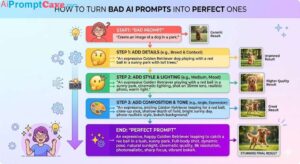
Bad Prompt
Make this product image better.
Better Prompt
Transform this product into a premium luxury commercial image with cinematic studio lighting, realistic reflections, sharper textures, and a clean premium background.
Specific prompts outperform vague prompts almost every time.
2. Trying to Edit Everything at Once
Another major beginner mistake:
Overloading the prompt.
Example:
Change the outfit, replace the background, improve lighting, fix skin, add rain, make it cinematic, change hairstyle, improve realism, add neon signs.
Too much.
When too many instructions compete at once, Nano Banana may:
ignore details
mix instructions incorrectly
create visual chaos
reduce consistency
Better Workflow
Use sequential editing.
Step 1
Fix composition.
Step 2
Improve lighting.
Step 3
Adjust realism.
Step 4
Add atmosphere.
Professional creators edit in stages.
3. Forgetting to Protect Important Elements
Nano Banana may accidentally modify parts you wanted preserved.
For example:
You want a new background…
But suddenly:
face changes
clothes change
jewelry disappears
pose shifts
This happens because you forgot constraints.
Fix
Explicitly state what must stay unchanged.
Example:
Replace the background with a luxury café while keeping the face, hairstyle, clothing, expression, and pose exactly the same.
Boundaries improve consistency dramatically.
4. Ignoring Lighting Direction
Lighting is one of the biggest reasons AI images feel fake.
A common mistake:
Adding elements without matching existing light.
Example:
A bright object added into a dark scene.
Or:
Light source conflicts.
Result?
The image feels pasted together.
Fix
Always define lighting consistency.
Example:
Match lighting, shadows, reflections, and direction with the existing environment.
This instantly improves realism.
5. Using Generic Style Words
Beginners often say:
Make it realistic.
But realism is vague.
Realistic fashion photography?
Luxury advertising realism?
Natural daylight realism?
Editorial realism?
Better Approach
Use descriptive photography language.
Example:
Professional commercial photography, soft cinematic studio lighting, realistic shadows, shallow depth of field, detailed textures.
More context = better results.
6. Ignoring Camera Language
Nano Banana responds well to photography terminology.
Many users forget this.
Instead of:
Make it cinematic.
Try:
Shot with a 50mm lens, cinematic framing, shallow depth of field, soft volumetric lighting.
Useful keywords:
Camera Angles
low-angle shot
close-up
wide-angle perspective
Lens Types
macro lens
50mm lens
telephoto lens
Composition
centered composition
editorial framing
dramatic perspective
Camera language improves quality significantly.
7. Using Low-Quality Source Images
Bad input often creates bad output.
Blurry images make editing harder.
Common issues:
pixelation
compression
bad lighting
unclear faces
Nano Banana works best with:
clean images
high resolution
clear subjects
proper lighting
Garbage in = garbage out.
8. Forgetting Character Consistency
If you’re building recurring characters or influencers, inconsistency becomes a major problem.
Many users write:
Put this person at the beach.
But don’t specify consistency.
Result?
The person looks different.
Fix
Use identity-lock language.
Example:
Preserve identical facial features, hairstyle, body proportions, and expression.
Helpful phrases:
keep appearance identical
maintain facial structure
preserve clothing details
Small instructions create major improvements.
9. Overusing Effects
Beginners often overload visuals.
Too much:
glow
fog
particles
lens flare
neon lighting
The result feels cheap.
Professional visuals usually look:
clean
intentional
restrained
Less is often better.
10. Ignoring Composition
Many AI images fail because composition feels messy.
Too many floating objects.
No focal point.
Visual confusion.
Ask yourself:
What should viewers notice first?
Professional compositions usually prioritize:
Main subject
Supporting elements
Background atmosphere
Clear visual hierarchy matters.
11. Using Conflicting Instructions
Conflicting prompts confuse Nano Banana.
Bad example:
Dark moody lighting with bright sunny atmosphere.
Or:
Minimalist chaotic scene.
Conflicts reduce quality.
Be consistent.
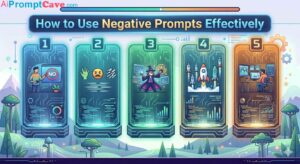
12. Not Using Negative Instructions
Negative prompting is underrated.
Many users only say what they want.
But forget to say:
What should NOT happen?
Helpful negatives:
No blur, no distortion, no bad anatomy, no extra fingers, no messy composition.
This improves output cleanliness.
13. Unrealistic Product Editing
Product images often fail because users ignore physical realism.
Example mistakes:
floating shadows
warped packaging
impossible reflections
Fix
Be specific.
Example:
Keep accurate proportions and realistic commercial product photography details.
Commercial realism matters.
14. Ignoring Material Details
Nano Banana performs much better with material descriptions.
Instead of:
Luxury chair
Try:
Premium matte black leather gaming chair with realistic stitching and brushed gold metal frame.
Material specificity improves realism dramatically.
Useful keywords:
matte finish
brushed gold
polished chrome
realistic leather texture
15. Expecting Perfect Results in One Attempt
This mindset ruins results.
AI is iterative.
Professionals refine outputs repeatedly.
Typical workflow:
Version 1
Fix composition.
Version 2
Improve lighting.
Version 3
Enhance realism.
Version 4
Fine-tune details.
Treat Nano Banana like collaboration—not magic.
16. Forgetting About Shadows
Objects without shadows feel fake.
Example:
Adding a chair…
But no shadow underneath.
Instantly unrealistic.
Fix
Example prompt:
Add realistic shadows consistent with scene lighting.
Tiny instruction.
Huge improvement.
17. Poor Background Choices
Busy backgrounds often ruin focus.
Common mistake:
Too much visual noise.
Professional visuals often use:
clean backgrounds
controlled depth
subtle atmosphere
Keep attention on the subject.
18. Ignoring Perspective Matching
One major realism killer:
Perspective mismatch.
Example:
Object angle doesn’t match camera angle.
Result?
Photoshop-like fake appearance.
Fix
Specify:
Match perspective and camera angle naturally.
19. Weak Prompt Structure
Random prompts produce random outputs.
Bad:
Luxury product futuristic cool premium ad dark black realistic.
Premium gaming chair in black and gold, futuristic luxury advertising style, cinematic studio lighting, dark premium background, preserve realistic proportions, ultra-detailed.
Structure matters.
20. Forgetting Aspect Ratio Strategy
Wrong aspect ratio hurts results.
9:16
Best for:
TikTok
Reels
Shorts
4:5
Best for:
Instagram posts
16:9
Best for:
YouTube banners
cinematic scenes
Choose intentionally.
21. Making Everything Hyper-Detailed
Sometimes creators over-detail prompts.
Example:
50+ instructions.
AI becomes overwhelmed.
Focus on:
core subject
lighting
realism
composition
Keep prompts focused.
22. Not Thinking Like an Art Director
Professional users think differently.
They ask:
What is the mood?
What is the focal point?
What emotion should this image create?
What lighting supports that emotion?
This mindset improves outputs dramatically.
Beginner vs Professional Workflow
Beginner
One giant messy prompt.
Professional
Small improvements in stages.
This single change often produces dramatically better results.